A simple guide to smart dispatcher.
Choose the right tool after identifying a domain, URL, or IP address.
Open Smart dispatcherWhat this tool tells you
The dispatcher looks at the shape of your input and suggests a next step. It does not scan the target or establish whether the address is safe.
Try it in SiteTrace
- Enter a domain, full HTTP/HTTPS URL, or valid IP address.
- Choose Identify target. This classification happens locally.
- Select a suggested tool for the question you actually want to answer.
This utility works locally in your browser. The screenshot shows one example result.
What your result looks like
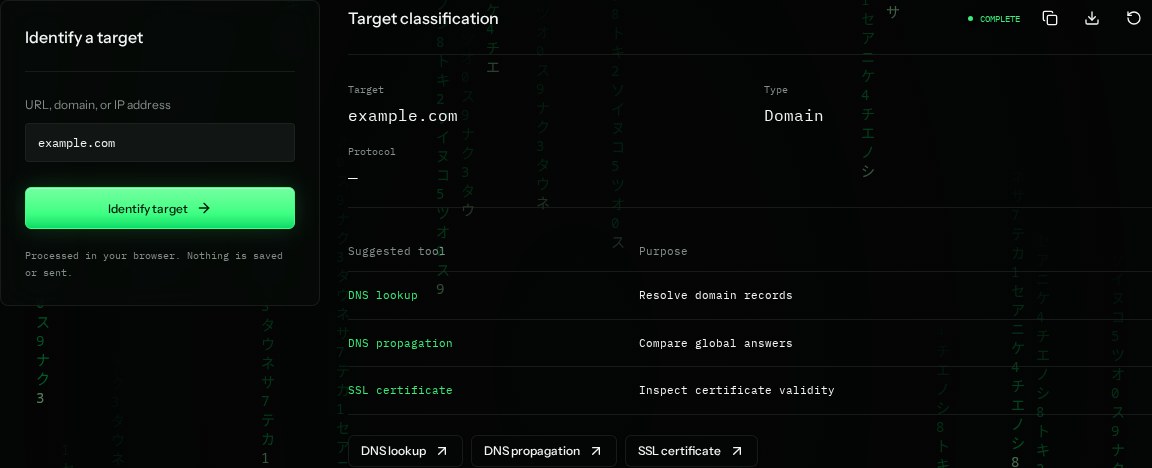
How to read the information
- Target
- The hostname from a URL, or the address/name you entered.
- Type
- Website URL, IP address, or Domain. This is a format classification, not a diagnosis.
- Protocol
- HTTP or HTTPS when a full URL is provided. A dash means no URL protocol was supplied.
- Suggested tools
- IP inputs suggest ownership and reputation checks; URLs suggest page/header checks; domains suggest DNS and certificate checks.
What the example means
For example.com, start with DNS if the name does not resolve. For a working URL with a sharing issue, choose Open Graph preview.
On your Mac or Windows PC
Mac instructions
Open SiteTrace in your browser, paste the target, and use the suggested tool links. To classify it manually, https:// starts a URL; dotted numeric addresses are usually IPv4.
A check from your computer reflects your own connection. It may differ from a remote test or the mockup shown here.
Keep this in mind
Suggested tools are starting points, not automatic conclusions. An address being valid does not mean it exists or is safe to visit.