A simple guide to security headers.
Read a protection report without treating a grade as a complete security audit.
Open Security headersWhat this tool tells you
Security headers instruct browsers to restrict certain behaviors. They can reduce risks, but they do not fix unsafe application code or replace a security review.
Try it in SiteTrace
- Enter the full HTTPS URL.
- Choose Preview security report to see the illustrative B grade.
- Review missing headers and the actual values of headers marked present.
The current tool shows fixed mockup data—not a live check of the address you enter. The screenshot below is an example, not a diagnosis.
What your result looks like
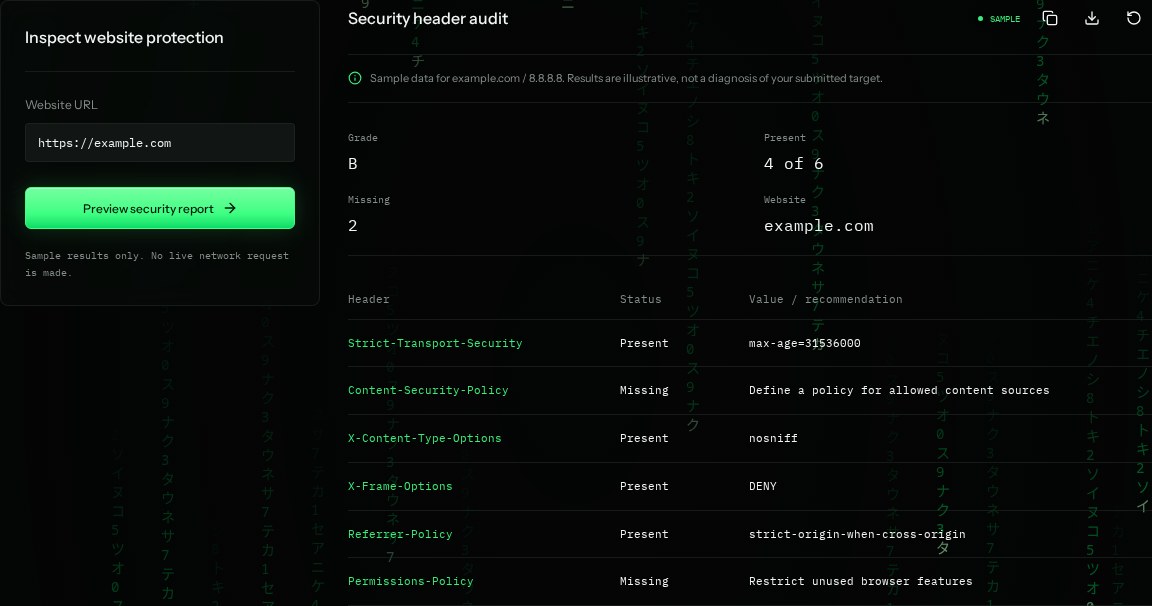
How to read the information
- HSTS
- Strict-Transport-Security asks browsers to use HTTPS on future visits. Configure it carefully; it can affect subdomains.
- Content-Security-Policy
- Defines permitted sources for scripts and other content. The sample is missing it. Test a policy before enforcing it.
- X-Content-Type-Options
- nosniff asks the browser not to guess a different content type.
- Permissions-Policy
- Restricts features such as camera or location. Missing does not mean those features are automatically in use.
What the example means
The example needs a considered CSP and Permissions-Policy. A present header with a weak value may still need improvement.
On your Mac or Windows PC
Mac instructions
Read the response headers in Terminal. The command displays values; it does not calculate a security grade.
curl -I https://example.comA check from your computer reflects your own connection. It may differ from a remote test or the mockup shown here.
Keep this in mind
The B grade is illustrative. A valid header configuration depends on your app; copy-pasting strict policies can break scripts, embeds, or sign-in.