A simple guide to bulk url status.
Read several URL results at once and spot redirects and errors.
Open Bulk URL statusWhat this tool tells you
A bulk check is useful after publishing or moving pages. It shows which URLs respond, which redirect, and which need attention.
Try it in SiteTrace
- Paste full HTTP or HTTPS URLs, one per line, up to 50.
- Choose Preview URL report for the fixed three-URL example.
- Review errors first, then confirm that redirected pages reach the intended destination.
The current tool shows fixed mockup data—not a live check of the address you enter. The screenshot below is an example, not a diagnosis.
What your result looks like
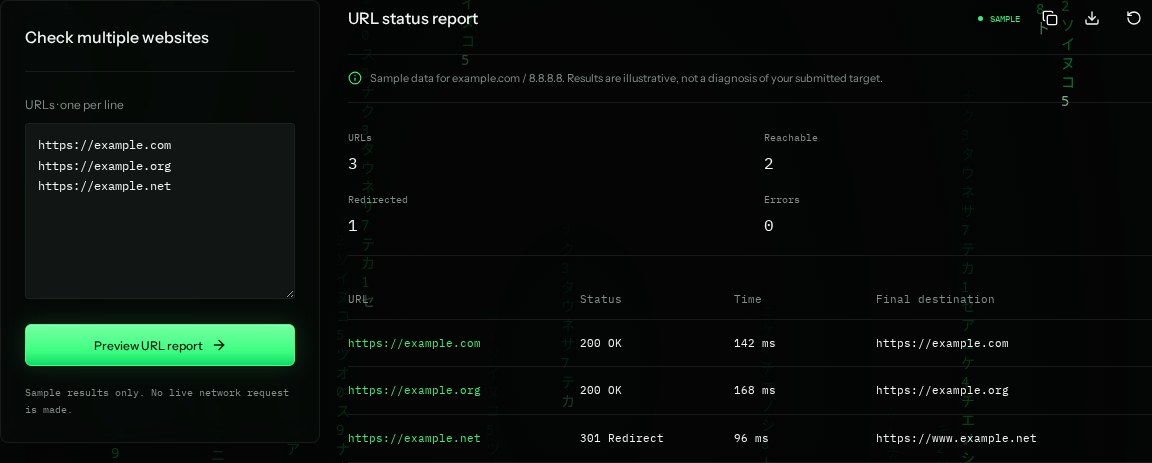
How to read the information
- URLs: 3
- Three entries are shown in the example. Your submitted list is not checked live.
- 200 OK
- The two sample pages respond successfully.
- 301 Redirect
- A permanent move. Review the destination and update internal links when appropriate.
- Final destination
- Where the example redirect points. Redirect chains can introduce delay or lead to the wrong page.
What the example means
The example has two successful URLs and one redirect. A redirect is not necessarily an error, but its destination matters.
On your Mac or Windows PC
Mac instructions
Paste this small loop into Terminal. It prints a status for each URL without following redirects.
for url in https://example.com https://example.org; do
  printf "%s " "$url"
  curl -s -o /dev/null -w "%{http_code}\n" "$url"
done
A check from your computer reflects your own connection. It may differ from a remote test or the mockup shown here.
Keep this in mind
Only check URLs you are allowed to access, and avoid large rapid batches. This example does not follow redirects; add curl's -L only when you intend to follow them.