A simple guide to vpn check.
Learn the difference between VPN, proxy, Tor, and hosting signals.
Open VPN checkWhat this tool tells you
This check describes how a network connection may be routed. It is useful for understanding unusual traffic, but it cannot prove who is using an address.
Try it in SiteTrace
- Enter an IP address.
- Choose Preview signals. The example is a Google datacenter address.
- Compare all four signals instead of relying on a single yes or no.
The current tool shows fixed mockup data—not a live check of the address you enter. The screenshot below is an example, not a diagnosis.
What your result looks like
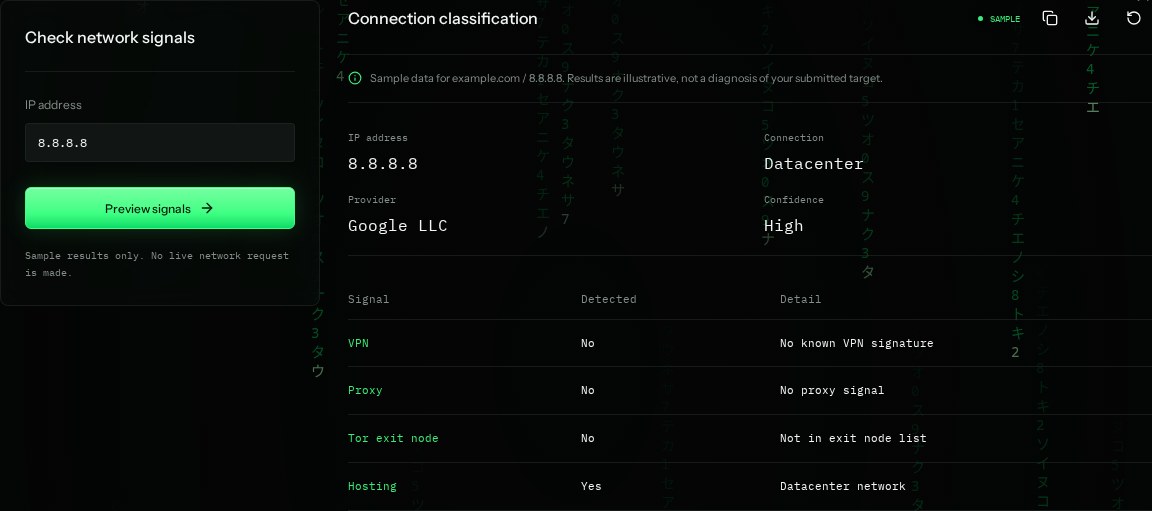
How to read the information
- VPN
- A known VPN-network signal. No means the sample does not identify one, not that VPN use is impossible.
- Proxy
- A proxy relays requests. It may be a legitimate company gateway or an anonymizing service.
- Tor exit node
- An address known to send traffic out of the Tor network. Exit lists change frequently.
- Hosting: Yes
- The address belongs to a datacenter network. Hosting is not the same as VPN use.
What the example means
The sample identifies hosting, but no VPN, proxy, or Tor signal. Datacenter traffic is not automatically malicious.
On your Mac or Windows PC
Mac instructions
On Mac, use a provider's VPN/proxy lookup in your browser. Full privacy classifications often require a paid plan or an API token.
A check from your computer reflects your own connection. It may differ from a remote test or the mockup shown here.
Keep this in mind
These are probabilistic signals. New services, shared networks, and residential proxies can produce false positives or missed detections.