A simple guide to ip lookup.
Find out who owns an IP address—and what its location really tells you.
Open IP lookupWhat this tool tells you
An IP address is a network address, not a person's identity. A lookup helps you recognize the provider behind a connection and understand where its network is registered.
Try it in SiteTrace
- Enter an IPv4 or IPv6 address, such as 8.8.8.8.
- Choose Preview lookup. The current diagnostic uses a fixed example, even if you enter a different address.
- Start with the organization and network, then treat the location as an estimate.
The current tool shows fixed mockup data—not a live check of the address you enter. The screenshot below is an example, not a diagnosis.
What your result looks like
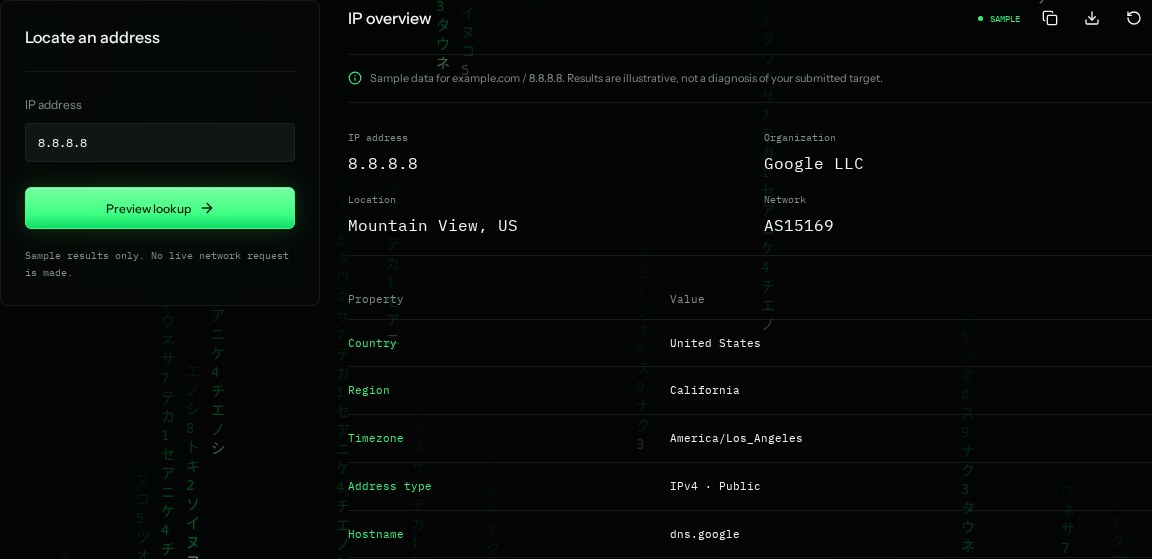
How to read the information
- Organization
- Google LLC is the organization associated with the example address. It is not the name of a person using it.
- Location
- Mountain View, US is an approximate network location. It does not locate a device or street address.
- AS15169
- An autonomous system number identifies a network that routes internet traffic. Here it belongs to Google.
- Hostname
- dns.google is a name associated with the address. Reverse names can be absent or outdated.
What the example means
The example is consistent with Google's public DNS service. It does not tell you where an individual user lives.
On your Mac or Windows PC
Mac instructions
Open Terminal and run this built-in command for a reverse name lookup. It does not provide location or ownership details.
nslookup 8.8.8.8A check from your computer reflects your own connection. It may differ from a remote test or the mockup shown here.
Keep this in mind
Geolocation can be inaccurate, especially for mobile networks and VPNs. A lookup is context, not proof of identity.