A simple guide to ip reputation.
Understand blocklist results without mistaking a clean report for a safety guarantee.
Open IP reputationWhat this tool tells you
Reputation checks look for an address on known abuse or spam lists. They help investigate suspicious traffic or mail delivery problems, but a listing needs context.
Try it in SiteTrace
- Enter the IP address you want to investigate.
- Choose Preview reputation to view the four-source example report.
- Read each source individually and verify any real listing with that source's official lookup.
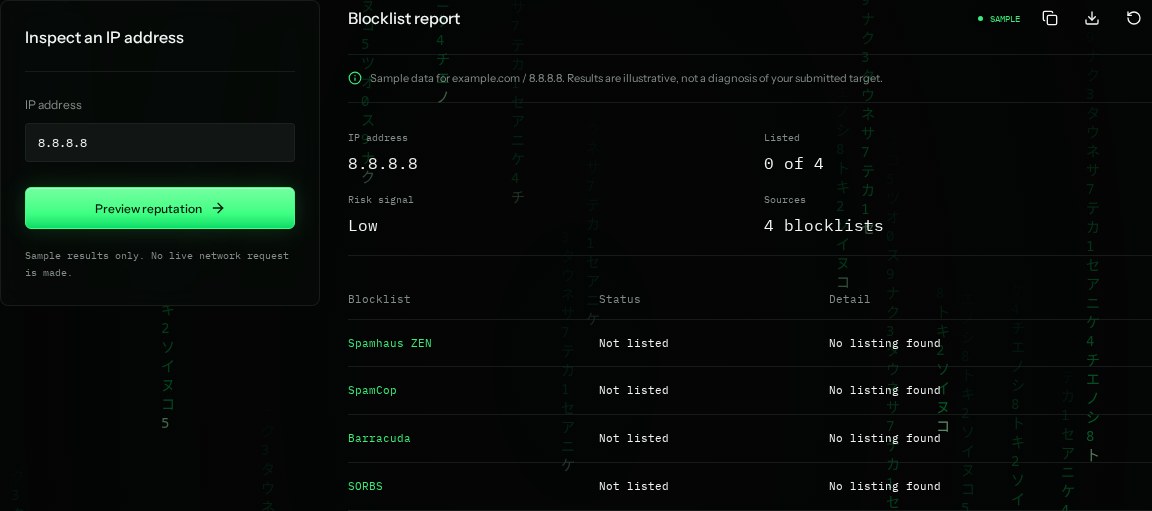
The current tool shows fixed mockup data—not a live check of the address you enter. The screenshot below is an example, not a diagnosis.
What your result looks like
How to read the information
- Listed: 0 of 4
- None of the four sample sources flags this address. This is not a live blocklist check.
- Risk signal: Low
- A summary of the sample listings, not a guarantee that traffic is safe.
- Not listed
- The example has no listing for that source. A failed query in a real check must not be counted as clean.
- Sources
- Different blocklists have different purposes, update times, and removal procedures.
What the example means
The example has no reported listings. Keep normal security checks in place; an unlisted address can still cause harm.
On your Mac or Windows PC
Mac instructions
On Mac, open the relevant blocklist's official lookup page in a browser and paste the address. No Terminal command or installation is needed.
A check from your computer reflects your own connection. It may differ from a remote test or the mockup shown here.
Keep this in mind
The sources shown are illustrative and may no longer operate. DNS blocklist queries have provider access rules and error codes; do not treat every 127.x reply as a listing.