A simple guide to subnet calculator.
Turn /24 into a network, an address range, and a usable host count.
Open Subnet calculatorWhat this tool tells you
A subnet groups IP addresses together. The slash number, called a CIDR prefix, says how much of the address identifies the network.
Try it in SiteTrace
- Enter an IPv4 network such as 192.168.1.0/24.
- Choose Calculate subnet. This utility calculates your actual input in the browser.
- Use the network and host range when planning a network you manage.
This utility works locally in your browser. The screenshot shows one example result.
What your result looks like
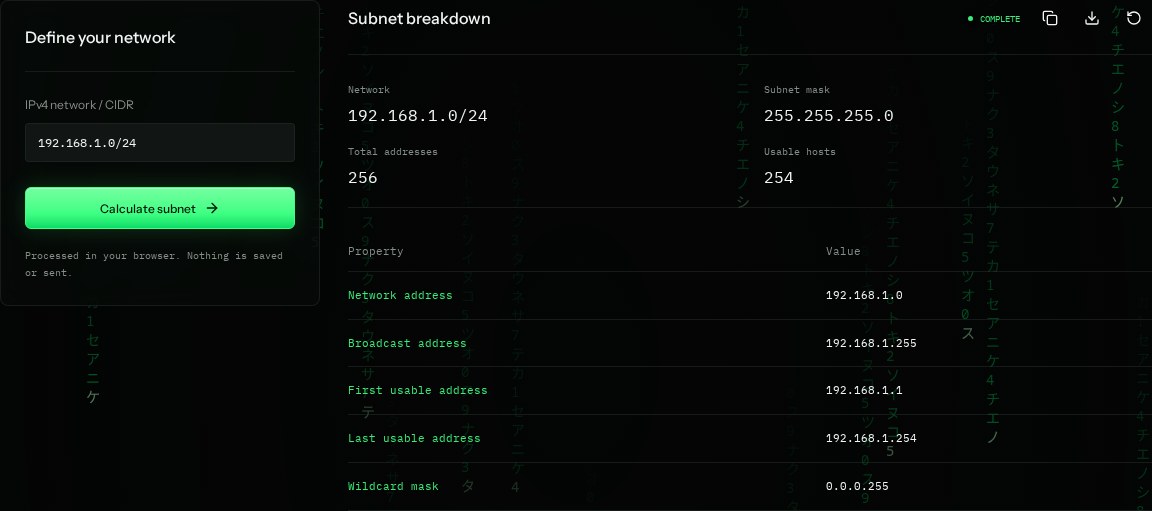
How to read the information
- Network
- 192.168.1.0/24 is the whole subnet, not one device.
- Subnet mask
- 255.255.255.0 is another way to write the /24 boundary.
- Total addresses
- A /24 contains 256 addresses. In a normal /24, the first and last are reserved.
- Usable hosts
- 254 addresses run from 192.168.1.1 to 192.168.1.254. /31 and /32 use different rules.
What the example means
A router and devices in this example normally use the usable host range. Do not assign the network or broadcast address to an ordinary host.
On your Mac or Windows PC
Mac instructions
Use the SiteTrace calculator in Safari or Chrome. If Python 3 is installed separately, this command shows the subnet; Python is not guaranteed to be installed on a Mac.
python3 -c "import ipaddress; n=ipaddress.ip_network('192.168.1.0/24'); print(n, n.netmask, n.broadcast_address, n.num_addresses)"A check from your computer reflects your own connection. It may differ from a remote test or the mockup shown here.
Keep this in mind
This calculator covers IPv4, not IPv6. Check your router's DHCP settings before assigning a static address to avoid conflicts.