A simple guide to seo checker.
Read page titles, descriptions, and indexing checks without chasing a perfect score.
Open SEO checkerWhat this tool tells you
An on-page SEO check looks at information search engines use to understand a page. It helps identify missing or confusing metadata, not predict search rankings.
Try it in SiteTrace
- Enter the page's full URL.
- Choose Preview SEO audit for the six-check example.
- Fix meaningful warnings first, and check that each page has its own accurate title and summary.
The current tool shows fixed mockup data—not a live check of the address you enter. The screenshot below is an example, not a diagnosis.
What your result looks like
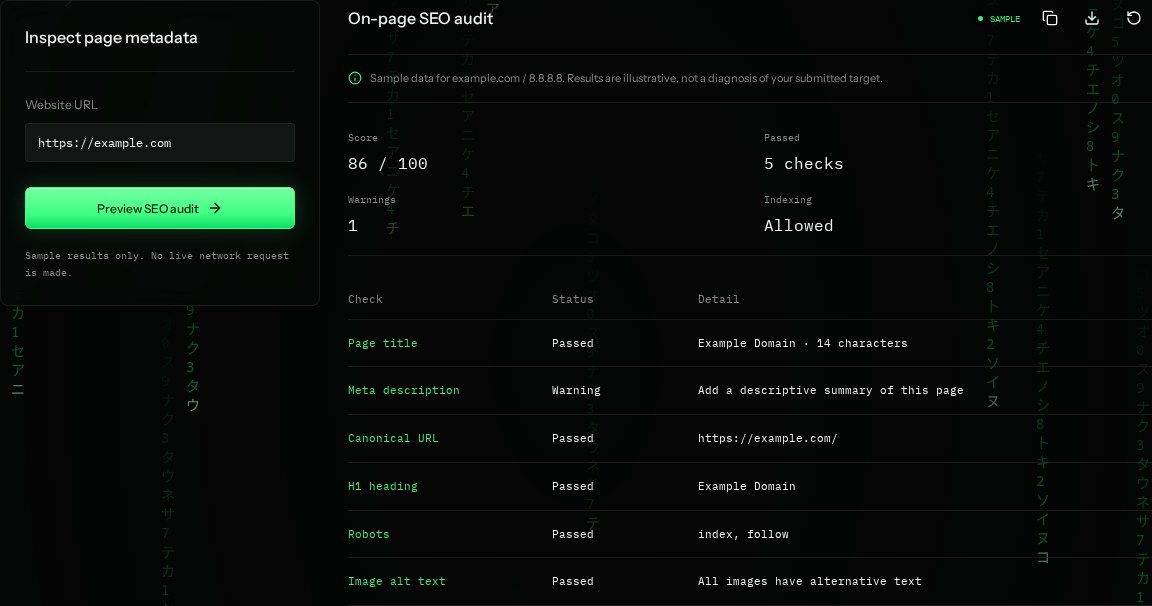
How to read the information
- Score: 86 / 100
- An illustrative summary, not a search engine score or ranking forecast.
- Page title / H1
- The title labels the browser tab and search result; H1 is the main visible heading. Both should describe this page.
- Meta description warning
- The sample is missing a useful summary. Search engines may rewrite descriptions even when you supply one.
- Canonical / robots
- Canonical suggests the preferred URL. Robots instructions influence crawling and indexing; Allowed is not proof of indexing.
What the example means
The example needs a descriptive summary. Good metadata supports useful content; it cannot guarantee traffic or indexing.
On your Mac or Windows PC
Mac instructions
In Chrome on Mac, open the page, choose View → Developer → View Source, and search for <title, description, canonical, and robots. Read the visible main heading too.
A check from your computer reflects your own connection. It may differ from a remote test or the mockup shown here.
Keep this in mind
Page source may not show content added by JavaScript. Alt text should explain meaningful images; a technical pass does not establish that the wording is useful.