A simple guide to dns lookup.
Find a domain's DNS records and understand addresses, mail routes, and TTL.
Open DNS lookupWhat this tool tells you
DNS translates names into records. You can use it to find a website's address, a domain's mail servers, or verification text.
Try it in SiteTrace
- Enter a domain without https://, such as example.com.
- Choose a record type and resolver, then Preview records.
- Compare the returned name, type, and value with the record you expected.
The current tool shows fixed mockup data—not a live check of the address you enter. The screenshot below is an example, not a diagnosis.
What your result looks like
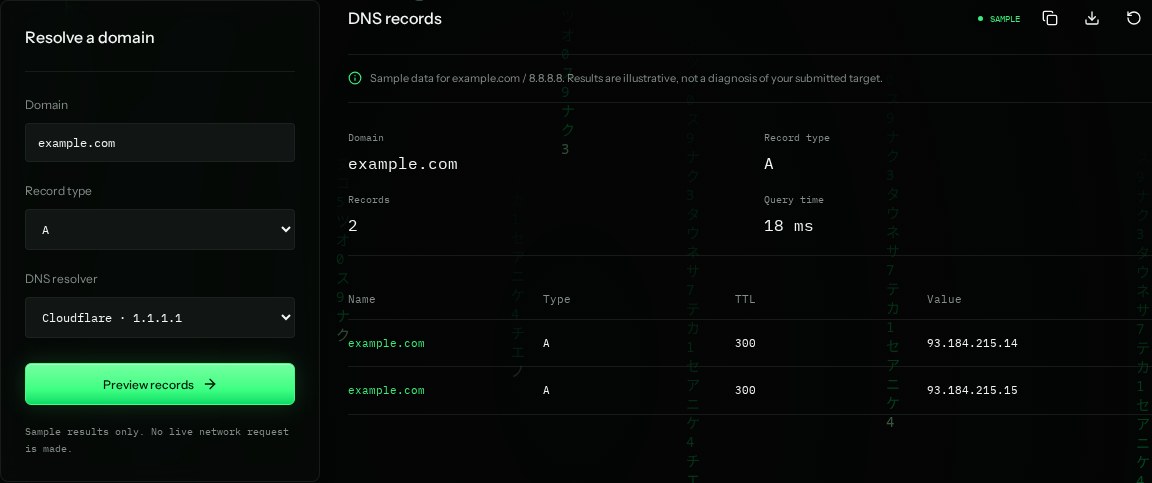
How to read the information
- A
- An IPv4 address record. AAAA is the IPv6 equivalent.
- Value
- 93.184.215.14 and .15 are illustrative addresses in the sample, not a current answer for example.com.
- TTL: 300
- A resolver may cache this answer for 300 seconds, or five minutes. Remaining TTL may decrease.
- MX / TXT / CNAME
- MX routes mail, TXT holds text such as verification records, and CNAME points one name to another.
What the example means
Two A records can be normal when traffic is shared across servers. A record existing does not prove the website is reachable.
On your Mac or Windows PC
Mac instructions
Open Terminal. Change A to MX or TXT for other records. A targeted query is more useful than ANY, which may return only a limited answer.
dig example.com AA check from your computer reflects your own connection. It may differ from a remote test or the mockup shown here.
Keep this in mind
DNS records change and caches can differ. Check the correct hostname; example.com and www.example.com may have different records.