A simple guide to ssl certificate.
Check the name, dates, issuer, and trust behind an HTTPS certificate.
What this tool tells you
A TLS certificate helps your browser authenticate a website and encrypt the connection. People often call it an SSL certificate, although modern sites use TLS.
Try it in SiteTrace
- Enter the domain and port, normally 443.
- Choose Preview certificate for the illustrative certificate details.
- Check the hostname, validity dates, and trust chain—not just the issuer.
There is no in-browser tool for this diagnostic — your computer or network has to perform it. The Mac and Windows commands below show how to run it yourself.
What your result looks like
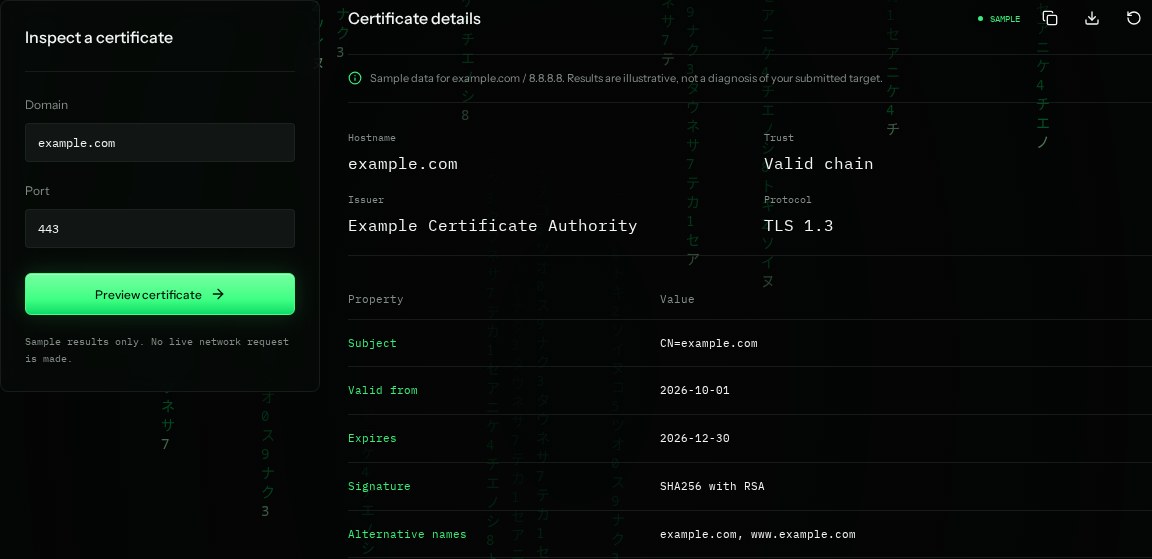
How to read the information
- Subject / alternative names
- The certificate must cover the hostname you opened. Modern hostname checks use the subject alternative names, or SANs.
- Issuer
- The authority that signed the certificate. The sample's Example Certificate Authority is fictional.
- Valid from / expires
- The period the certificate is valid. The sample dates are illustrative and do not count down or update.
- Valid chain / TLS 1.3
- Trust depends on a chain accepted by the client. TLS 1.3 is the connection protocol, not a safety rating for the site.
What the example means
The sample claims a matching, trusted certificate. A real trusted certificate protects transport; it does not prove a website or business is honest.
On your Mac or Windows PC
Mac instructions
Open the HTTPS page in Chrome on Mac. Click the site controls beside the address, then Connection is secure → Certificate is valid to view dates and names.
A check from your computer reflects your own connection. It may differ from a remote test or the mockup shown here.
Keep this in mind
Never bypass a browser certificate warning just to complete a check. An expired certificate, wrong hostname, or untrusted issuer needs investigation by the site owner.