A simple guide to email deliverability.
Learn what SPF, DKIM, and DMARC say about your domain's mail setup.
Open Email deliverabilityWhat this tool tells you
Email authentication helps receiving servers verify who may send mail for your domain. It reduces impersonation risk, but it cannot guarantee inbox placement.
Try it in SiteTrace
- Enter your sending domain, not a full email address.
- Enter the DKIM selector supplied by your email service.
- Choose Preview email report and read SPF, DKIM, DMARC, and MX together.
The current tool shows fixed mockup data—not a live check of the address you enter. The screenshot below is an example, not a diagnosis.
What your result looks like
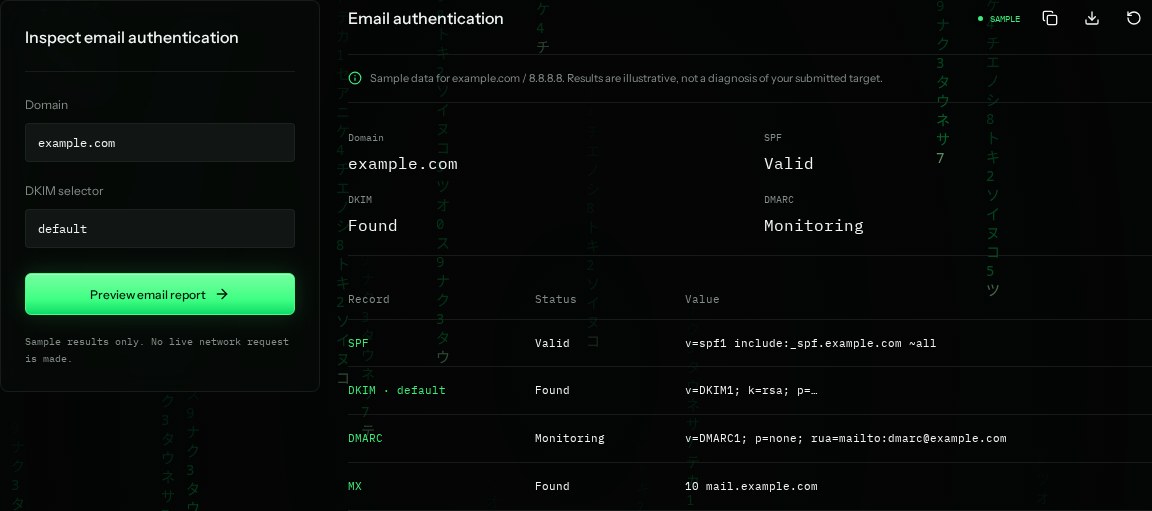
How to read the information
- SPF: Valid
- The sample TXT record authorizes specified senders. ~all is a soft fail for others. Real validity also depends on DNS lookup limits.
- DKIM: Found
- A public key exists for the sample selector. This alone does not prove outgoing messages are signed correctly.
- DMARC: Monitoring
- p=none requests reports without asking receivers to quarantine or reject mail solely through this policy.
- MX
- The servers that receive mail for the domain. MX does not authorize outgoing senders.
What the example means
The example has authentication records but a monitoring-only DMARC policy. Review real message headers and reports before tightening the policy.
On your Mac or Windows PC
Mac instructions
Run in Terminal. Replace default with your actual DKIM selector; the sample key and SPF domain are fictional.
dig example.com TXT
dig default._domainkey.example.com TXT
dig _dmarc.example.com TXT
dig example.com MX
A check from your computer reflects your own connection. It may differ from a remote test or the mockup shown here.
Keep this in mind
Reputation, message content, recipient filters, and SPF/DKIM alignment affect delivery. Records being found does not prove a message passed authentication.